


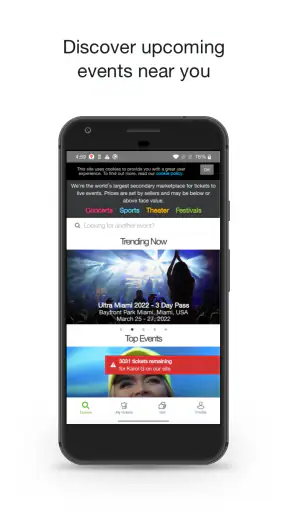
Finding tickets is easy when an event is still months away and every option is neatly organized. It becomes much harder when a concert, match, comedy show, or festival is nearly sold out and the official box office no longer has what you want. That is where I found viagogo Tickets useful: it gives me a broad marketplace to search when ordinary ticket channels have already become restrictive.
My first impression was practical rather than exciting. This is an events app from Viagogo, and its main purpose is to help people browse available tickets from a phone. It is free to install, rated for Everyone, and the current version is 105.19.67. The app has been available since May 14, 2015, so it is not a new experiment that disappears after one season.
That maturity matters because ticket buying is usually time-sensitive. I do not want to learn a complicated interface while deciding whether to attend a show. The app’s appeal comes from putting event discovery and ticket selection in one place, especially when I am willing to consider more than one date, section, or seating arrangement.
What makes the first week appealing
During the first few days of using it, I noticed that the app is most valuable as a search and comparison tool. I can start with an event I already know, browse available listings, and compare alternatives without switching between several unrelated pages. That is particularly helpful for popular events where the best choice is not simply “buy or do not buy,” but “which date and seat combination makes sense?”
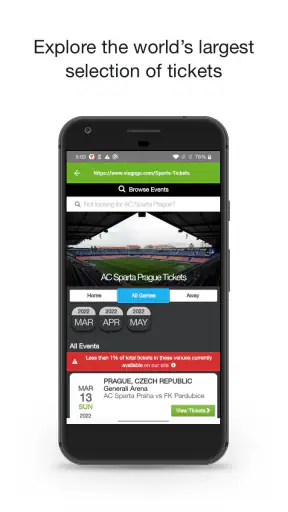
A realistic example is planning a weekend away around a match. I might search for the fixture, check more than one date, compare seating areas, and then decide whether the ticket is worth fitting into the travel plan. The app is useful in that situation because it supports the wider decision instead of treating the ticket as an isolated purchase.
The broad inventory is also helpful when I am flexible. If I only accept one exact section and one exact date, any marketplace can feel disappointing. If I am prepared to trade a little location for availability, or attend on a different evening, the range of listings becomes much more meaningful. Flexibility is the key to getting value from this app.
I would not use it as my only source for every event, though. My first step for a high-demand show is still to check the official seller or venue. That gives me a useful reference point for the original sale, seating layout, and normal ticket conditions. I then use viagogo Tickets to investigate alternatives when the official route is sold out, inconvenient, or no longer offers the date I need.
That two-step habit is one of the most important ways to use the app sensibly. A marketplace can show availability that the official channel does not, but availability alone does not tell me whether a listing is the right purchase. I want to understand the venue, the section, and the total cost before committing.
Searching is only half of the decision
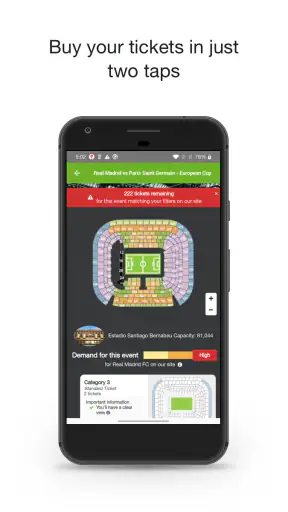
The most useful workflow is to begin with the event, then narrow my thinking around date, seating area, and budget. I avoid choosing the first attractive listing because a nearby option may offer a better balance. For a group, I also pay attention to whether seats are together rather than assuming that several tickets in one listing automatically solve the problem.
Another practical tip is to treat the displayed ticket as part of a larger outing. A cheaper seat may be a poor bargain if it creates a long journey across town, while a slightly more expensive date may work better with transport and accommodation. The app helps me compare ticket opportunities, but I still have to make the human decision about the whole trip.
That is where the service feels more useful than a simple list of events. It supports people who are actively weighing options. It is less compelling for someone who already knows the exact official ticket they want and can buy it directly without searching elsewhere.
What the early experience does not solve
The first-week excitement can come from seeing many possibilities in one place, but that does not remove the normal risks of marketplace shopping. I still need to read the listing carefully, inspect the seating description, and review the final purchase details before paying. A large selection can create the impression that there is always a perfect deal waiting, when in reality the best option depends on timing and flexibility.
I also found that ticket browsing can become mentally tiring. Prices, dates, sections, and quantities compete for attention. The app is strongest when I arrive with a clear plan, such as “I need two seats for this event and can accept either of these dates.” It is weaker when I scroll without a limit and let the number of choices make the decision for me.
Does it earn a place after the first month?
After the novelty fades, the app’s value depends on how often I attend live events. For a regular concertgoer, sports follower, or theatre fan, it can remain a convenient backup marketplace. I may not open it every day, but I can return whenever an official sale is closed or when I want to compare availability across an event that matters to me.
For occasional users, the value is more situational. Someone who attends one event every few years may not need a permanent ticket app at all. They can search when a specific occasion appears, compare the marketplace with the venue, and remove it afterward if they do not expect another purchase. The free price makes that approach reasonable, since keeping it installed does not require a subscription payment.
The app has a 4.2 average from around eleven thousand ratings and has passed one million installs. Those figures suggest that it has found a substantial audience, but they do not replace my own checks. A popular marketplace can still be the wrong fit for a particular event, especially if the official seller has suitable tickets or if I need unusually precise seating information.
Month to month, I see three recurring uses. The first is checking whether a sold-out event has become accessible through another listing. The second is comparing dates or sections when I am planning a group outing. The third is monitoring possibilities for an event I care about without being tied to the first option I see.
That last use needs discipline. I do not treat repeated browsing as progress. If I know my maximum budget and acceptable seating range in advance, the app helps me make a decision. Without those limits, it can encourage endless comparison, where every listing makes the previous one feel incomplete.
How it compares with the usual alternatives
The official venue or organizer remains the cleanest option when tickets are available there. It is usually the natural first stop for original inventory and event-specific information. I prefer it when I want the simplest purchase path and do not need marketplace flexibility.
General ticketing services can also be better when I am buying during the initial release, especially if I already know the venue and event organizer. Their advantage is directness. viagogo Tickets becomes more interesting when the normal route no longer gives me enough choices and I am prepared to compare resale-style availability.
Search engines and social media can help me discover an event, but they are not a substitute for a dedicated ticket marketplace. They scatter information across pages and make it harder to compare listings consistently. On the other hand, I would never treat a random social post as equivalent to a structured ticket listing. The convenience of a single app is valuable precisely because it reduces that scattered search.
For a last-minute buyer, the marketplace approach may be more useful than waiting for an official release that will not happen. For a careful planner who wants the lowest possible complexity, the official channel may still be better. Neither choice is universally superior; the right one depends on whether availability or simplicity is the main problem.
The real maintenance burden
One advantage of an event marketplace is that it does not demand a daily habit. I do not need to spend time configuring it every morning or maintaining a complicated profile just to search. I can return when I have a specific event in mind, which gives it a relatively light maintenance burden compared with apps that depend on constant engagement.
The maintenance is mostly personal rather than technical. I need to keep my expectations realistic, remember my spending limit, and verify each listing before purchase. I also need to avoid leaving a decision until the final moment if the event is important. The app may help me find possibilities, but it cannot make a risky deadline disappear.
My best routine is simple: check the official channel first, search the app with a defined budget, compare at least a few relevant listings, and review the final details before confirming. I also write down the event date and venue separately rather than relying on memory after browsing several options. That small habit prevents the common mistake of choosing a ticket that looks good but does not fit the rest of the plan.
For group purchases, maintenance means agreeing on priorities before opening the app. One person may care about being close to the stage, another about staying under budget, and another about attending on a particular date. Without that conversation, the app can turn a simple purchase into a long negotiation.
The Everyone age rating makes the app broadly accessible, but younger users should still involve a responsible adult when a purchase involves significant money or travel. The rating describes access to the app, not whether every ticket decision is financially suitable for every person.
Where the routine becomes frustrating
The first source of fatigue is choice overload. A wide selection sounds ideal, but more listings mean more reading and more comparisons. I find the experience calmer when I decide in advance which compromises are acceptable. If I will not consider a restricted view, a distant section, or a particular date, I remove those options mentally instead of repeatedly reopening them.
The second source is the emotional pressure around popular events. Scarcity can make me feel that I must act immediately, even when I have not fully checked the details. My practical rule is to slow down for the final review. A few extra moments spent checking the event, date, quantity, section, and total purchase information are more valuable than the excitement of being first.
The third is the gap between a ticket listing and the complete experience. A ticket may solve entry to the event, but it does not solve transport, accommodation, accessibility planning, or meeting arrangements. I use the app as one part of the plan, not as a complete event organizer.
There is also a psychological trade-off in using a marketplace after an official sale has ended. I may gain access to an event, but I need to be comfortable comparing the opportunity against the cost and conditions shown at checkout. If the price makes the whole outing uncomfortable, being able to find a ticket is not the same as finding good value.
Who should keep it installed?
I think the app earns lasting space on the phone of someone who regularly attends live events and wants a second route when official availability is limited. It is especially suitable for flexible buyers who can compare dates, seating areas, or event choices instead of demanding one exact combination.
It is also useful for people who plan trips around entertainment. If I am already considering a weekend in another city, browsing event availability can help me decide whether the trip is worthwhile. The app becomes part of the planning process rather than a last-second purchase tool.
I would skip keeping it installed if I rarely attend events, always buy directly from venues, or find marketplace comparison stressful. In those cases, the extra choice may not justify another app. I would also choose the official seller first whenever it has the ticket and conditions I want, because fewer steps usually means less room for confusion.
Families and groups should use it with a clear agreement about budget and seating. Solo buyers have an easier time because they can make the trade-offs themselves. For a large group, the app may still help, but the search becomes more dependent on finding suitable quantities and keeping everyone aligned.
My long-term verdict
After the initial appeal wears off, viagogo Tickets remains useful for a specific reason: it gives me another place to look when ordinary ticket buying has reached its limit. That is a real recurring benefit, but it is not a reason to open the app without a purpose. Its long-term value comes from occasional, well-defined use rather than constant browsing.
I appreciate the combination of free access, a mature product from Viagogo, and a large audience. The app’s 4.2 average rating shows generally positive reception, while the number of ratings—around eleven thousand—suggests that it is more than a niche utility. Still, popularity should not replace careful checking, and the broad selection should not push me into buying a ticket that does not fit my budget or plans.
My final recommendation is straightforward: install it when you are searching for a particular event, especially if the official route is sold out or too narrow, and use it as a comparison tool rather than an automatic first choice. Set your limits before browsing, check the full details before paying, and remember that the cheapest-looking option is not always the best overall outing.
For flexible event-goers, it earns a useful place in the toolkit; for everyone else, it is better treated as an on-demand backup. That balance is why I would recommend it to a friend who attends concerts, matches, festivals, or shows regularly, while still telling them to begin with the official seller and make the final decision with patience.


